What is command collision?
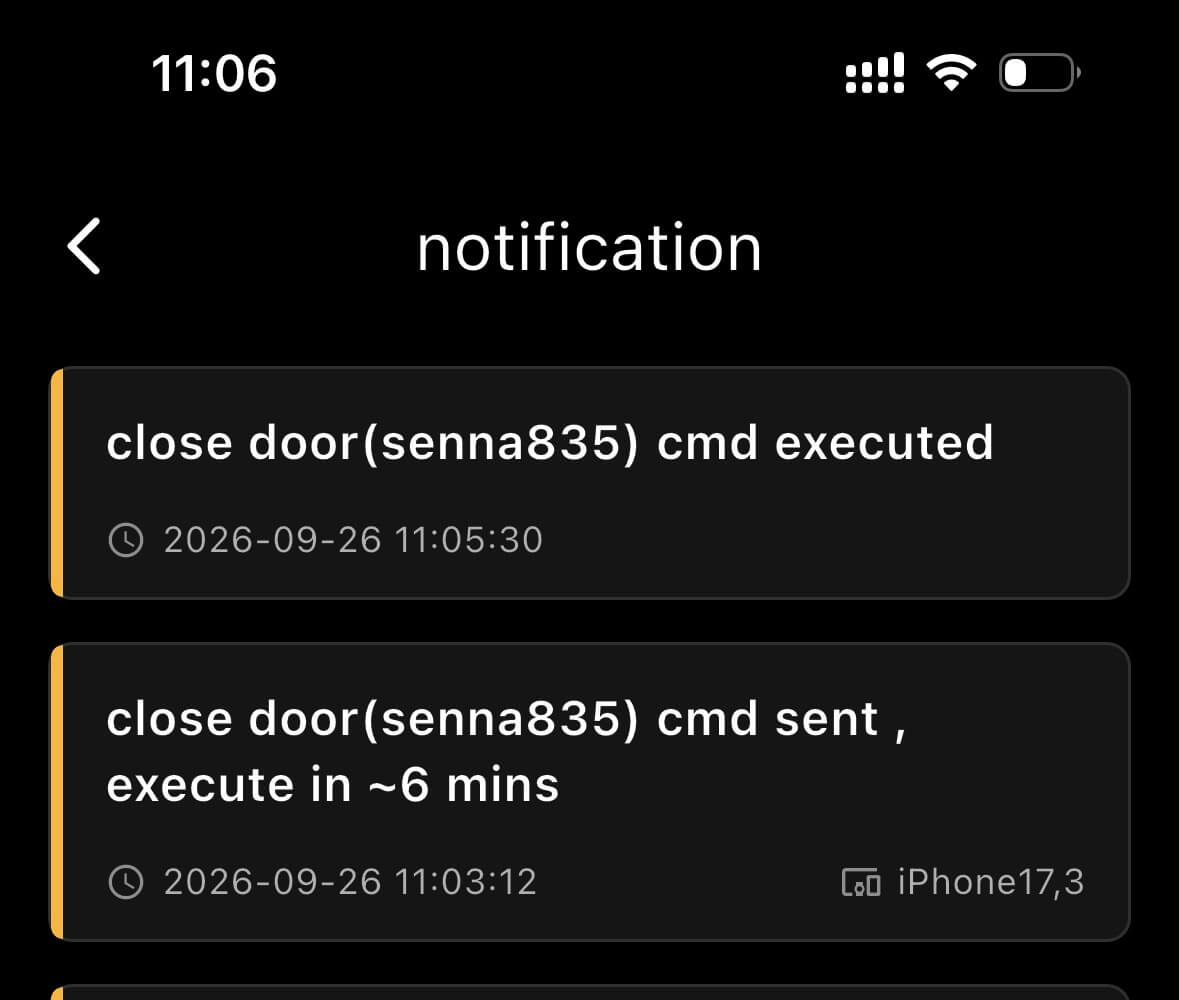
The coop door can be controlled from two places: the JJ Chicken App and the physical control panel. If commands are sent from both control points at nearly the same time, a command collision can occur. This may make the command timing and notification logs confusing.
For example, suppose you send a manual open command from the app. A message appears saying that it may take a few minutes for the device to execute the command. When you open the notification page, the log says: "Command will execute in approximately 6 minutes."
If you do nothing, the coop door will check the internet during its next scheduled connection. It will find the pending open command and execute it after about six minutes.
However, if you press any physical-panel button during this six-minute period, such as Open, Close, or Gear, the physical panel can trigger the coop door to check its internet connection earlier than scheduled. The pending open command may then be received and executed immediately.
As a result, the notification log may show that the coop door opened at 11:05, even though it would normally have opened about four minutes later during its regular connection cycle. This difference can make it appear that the door opened earlier than expected.
Because the coop door has two control points, and your account can also be shared with family members, multiple commands may be sent at nearly the same time. Waiting for the previous command to finish before sending another command from the other control point can help prevent command collisions and save you a lot of time.